Skip to content
October 31, 2026
Newsletter
Random News
Salesforce Shastras Logo

Salesforce Shastras

Fuel Your Salesforce Dreams with Salesforce Shastras: The Ultimate Learning Hub for Newcomers

  • Free Salesforce Certification Vouchers/Coupons: 2024
  • Salesforce Community Sessions
  • About me
  • Privacy Policy
  • FINSforce
  • Home
  • Salesforce Developer
  • Implementing Real-Time Updates with Platform Events in LWC
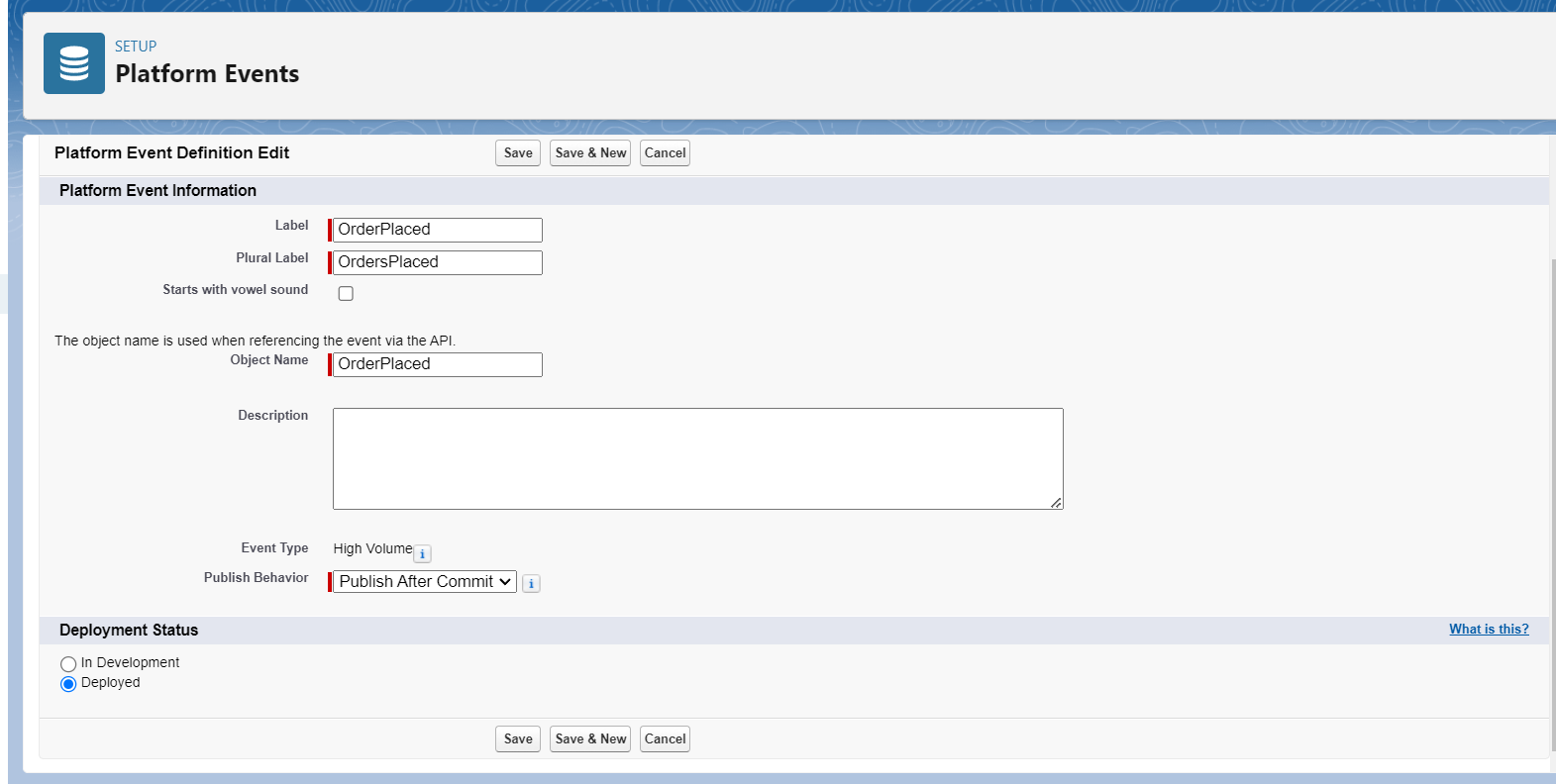
  • image-7

image-7

Post navigation

Previous: Implementing Real-Time Updates with Platform Events in LWC

Leave a Reply Cancel reply

Your email address will not be published. Required fields are marked *

Subscribe👇 to "FINSforce" for complete Financial Services Cloud (FSC) video tutorials!

Salesforce FSC Quick Tip: Financial Account Party Explained

The Problem: One financial account (like a joint FD) can belong to multiple people with different responsibilities.

The Solution: Financial Account Party (FAP) • Links: Person Account ↔ Financial Account
• Captures: Specific roles like Primary Owner, Joint Owner, and Beneficiary (Nominee).
• Evolution: Replaces the older managed package Financial Account Role.

Remember: Who owns what, in which role? That is Financial Account Party.

Subscribe to FINSforce for bite-sized FSC tutorials!

#SalesforceFSC #TechShorts #CRM #SalesforceAdmin #SalesforceArchitecture
Financial Account Party: who owns what in #financialservicescloud #fsc #salesforce
Ever wondered why one Salesforce FSC org has FinServ__ on every object while another has none?

In this quick breakdown, we cover the critical architectural shift in Financial Services Cloud:

🔹 Old FSC: Built on a managed package where objects are custom (FinServ__FinancialAccount__c).
🔹 New FSC: Built directly on the Salesforce Core platform as native standard objects (FinancialAccount).

Think of it like moving from a rented flat to your own house—direct upgrades, zero package limitations, and seamless standard API connectivity.

🔗 Watch the full detailed breakdown in Episode 5: https://youtu.be/VUSKhHsy6_o?si=hLTSwqCyL7ycN3ZN

#Salesforce #FinancialServicesCloud #FSC #SalesforceDeveloper #SalesforceAdmin #FINSforce #CloudArchitecture
Old vs New: FinServ namespace vs core objects in #financialservicescloud #fsc #salesforce
FINSforce Live Stream
Confused between Financial Account and Financial Holding in Salesforce Financial Services Cloud (FSC)? You’re not alone—this is one of the most commonly mixed-up concepts, even in Salesforce interviews!

In this quick 60-second breakdown, we clarify the key differences using a simple real-world analogy:

Financial Account: Think of it as the container or wardrobe (almari). It represents the account opened with a financial institution—such as a Savings Account, Home Loan, Credit Card, or Demat/Investment Account.
Financial Holding: Represents the actual assets or items stored inside that container—like 50 shares of a company, units of a mutual fund, or bonds.
📌 Subscribe to FINSforce for simplified Salesforce Financial Services Cloud concepts in under 60 seconds!

#Salesforce #FinancialServicesCloud #SalesforceFSC #FINSforce #SalesforceDeveloper #SalesforceAdmin #SalesforceInterview
Financial Account vs Financial Holding in FSC #financialservicescloud #fsc #finsforce #salesforce
Learn how to set up Record Alerts in Salesforce Financial Services Cloud (FSC), live in the org: access, FlexCard, Flow automation and the Business Rules Engine. No long theory, every click shown.

Record Alerts warn your bankers and advisors about a client risk the moment they open the record: KYC expired, low balance, defaulted credit card. In this episode we build three levels of alerts for our demo client, Priya Sharma:

🔹 Level 1: Create a record alert manually and show it with the Record Alerts FlexCard
🔹 Level 2: Automate record alerts with a record-triggered Flow (built with Agentforce Vibes)
🔹 Level 3: Create and auto-remove alerts with the Business Rules Engine (BRE)

✅ What you'll learn
• Record Alert Access, plus the FSC and OmniStudio permission sets you need
• Custom severity values (adding "Critical") and Record Alert Categories
• Record Alerts FlexCard in Lightning App Builder (max 20 alerts)
• Snooze, Dismiss and Resolve, and what each one really does
• Record Alert Actionable Targets and the Alert Action Center (create a task from an alert)
• Record Alert Templates and why the API name matters
• A KYC-expired alert from a Party Profile with a record-triggered Flow
• BRE low-balance alert: object & field alias, expression set (Usage Type: Record Alert), Record Alert Data Source, and Record Alert Data Source Expression Set Definition
• Testing with BRE simulation, and the alert disappearing when the balance goes back up

⏱️ CHAPTERS
0:00 Intro: what we'll build
1:01 What is a Record Alert? (Record vs Contextual Alert)
2:32 Demo setup: Priya Sharma
3:10 Step 1: Record Alert Access & permissions
6:50 Step 2: Custom severity values
7:50 Step 3: Create a record alert manually + FlexCard
11:04 Step 4: Actionable Targets & Alert Action Center
13:21 Step 5: Automate with Flow (built with Agentforce Vibes)
20:06 Step 6: Business Rules Engine scenario (low balance)
24:14 Step 7: Object and field alias
25:55 Step 8: Build the expression set
30:53 Step 9: Record Alert Data Source + Expression Set Definition
32:53 Demo: BRE creates and removes the alert
35:38 Wrap-up

💬 Want the custom Record Alert + Alert Action Center LWC from this video? Comment "ALERT" and I'll share it.

📺 Up next, EP15: Contextual Alerts with Data 360 + Data Consumption Framework: [link]
⏮️ Previous, EP13: Life Events & Business Milestones in FSC: [link]
📚 Full Financial Services Cloud course (EP1 → EP14): [playlist link]

About FINSforce
FINSforce is a complete, in-order course on Salesforce Financial Services Cloud, from the data model to real project configuration, for admins, developers and consultants working in banking, wealth and insurance.

🔔 Subscribe for a new FSC episode every week: https://www.youtube.com/@FINSforceHQ?sub_confirmation=1
📝 Companion posts: https://finsforce.com

#SalesforceFSC #FinancialServicesCloud #Salesforce
How to Automate Record Alerts in Salesforce FSC Using BRE | EP 14 #financialservicescloud
Master Salesforce FSC data architecture by distinguishing ACR and CCR connections.

An Account-Contact Relationship links a person to an account, such as a household or employer. Meanwhile, a Contact-Contact Relationship connects two individuals directly to define specific, reciprocal roles. Getting this right is essential for clean data in Financial Services Cloud.

Subscribe to FINSforce for more Salesforce FSC tips, and let us know your relationship model questions below.
Don't Build Salesforce FSC Without Knowing This #salesforce #developer #fsc
Did you know there is no dedicated Household object in Salesforce Financial Services Cloud (FSC)? 🤯

In this quick Short, we break down how Households actually work in FSC using the Account model, record types, and relationship groups so you can design your data architecture the right way.

🔔 Subscribe to FINSforce for more Salesforce Financial Services Cloud tips, architecture guides, and FSC tutorials!

💬 Have questions about FSC relationships or rollups? Drop them in the comments below!

#FinancialServicesCloud #SalesforceFSC #SalesforceAdmin #SalesforceDeveloper #FINSforce #SalesforceTips #CloudComputing #Shorts
How Households Actually Work in FSC #financialservicescloud #fsc #salesforce
In Salesforce Financial Services Cloud (FSC), is your customer an Account or a Contact?

A bank serves two main types of customers: individual retail clients and businesses. Learn how Salesforce structures them differently:

🔹 Person Account: Used for individual retail customers (e.g., an individual with a savings account). Salesforce combines Account and Contact fields into a single record. 🔹 Business Account: Used for companies and organizations (e.g., a commercial business entity). The business is the Account, while the employees or executives working there are linked as Contacts.

💡 Follow FINSforce for quick Salesforce FSC concepts explained simply!

#Salesforce #FinancialServicesCloud #SalesforceFSC #SalesforceAdmin #CRM #SalesforceTutorials #Shorts
Person vs Business Account in Financial Services Cloud #financialservicescloud
In this episode of our Salesforce Financial Services Cloud (FSC) series, we explore how to set up and configure Life Events and Business Milestones on Person and Business Accounts.

Learn why tracking key milestones (like starting a business, graduations, mergers, or funding rounds) is critical for wealth managers, bankers, and advisors to maintain client trust and personalize relationship management.

📌 What you'll learn in this video:

Why Life Events & Business Milestones matter in banking & wealth management
Adding the Events and Business Milestones component to Lightning pages
Differentiating between Person Accounts (Life Events) and Business Accounts (Milestones)
Customizing event types, picklists, and icons (SVG setup)
Managing, filtering, and logging new client events directly in Salesforce FSC
TIMESTAMPS: 
0:00 - Introduction & Real-World Banking Scenario
01:26 - Adding Events & Milestones Component to Account Page
02:40 - Viewing & Logging Person Account Life Events
03:38 - Customizing Event Icons & Picklist Values
05:51 - Business Milestones on Business Accounts
06:35 - Business Milestone Object & Field Customization
07:25 - Guided Setup Overview & Wrap-up

🔔 Don't forget to Subscribe to FINSforce for more Salesforce Financial Services Cloud tutorials and end-to-end courses!

#Salesforce #FinancialServicesCloud #SalesforceFSC #FINSforce #SalesforceAdmin #FinTech
How to Setup Life Events & Business Milestones in Salesforce FSC | EP 13
Subscribe

Categories


  • Apex Classes
  • Financial Services Cloud (FSC)
  • Lightning Web Components
  • Salesforce Admin
  • Salesforce Basics
  • Salesforce Career Tips
  • Salesforce Certifications
  • Salesforce Certifications Guide
  • Salesforce Community Spotlight
  • Salesforce Developer
  • Salesforce Integrations
  • Salesforce Interview
  • Salesforce Tips and Tricks
  • Salesforce Updates

Recent Posts


  • 10 Best Salesforce Coding Prompt Templates for Vibe Coding: The Developer’s Ultimate Cheat Sheet
  • Headless 360 for Financial services cloud, No Browser Required.
  • The End of Managed Packages: Salesforce’s Focus on Native Core Platforms for FSC
  • What Dreamforce 2025 Means for Digital Transformation and Business Growth
  • New Lightning Design System (SLDS 2) – (Beta)

Archives


  • June 2026
  • May 2026
  • March 2026
  • October 2025
  • February 2025
  • January 2025
  • September 2024
  • August 2024
  • July 2024
  • June 2024
  • May 2024
  • April 2024
  • March 2024
  • February 2024
  • January 2024
  • December 2023
  • November 2023
  • October 2023
  • September 2023
  • June 2023
Salesforce Shastras @ 2026 Powered By BlazeThemes.